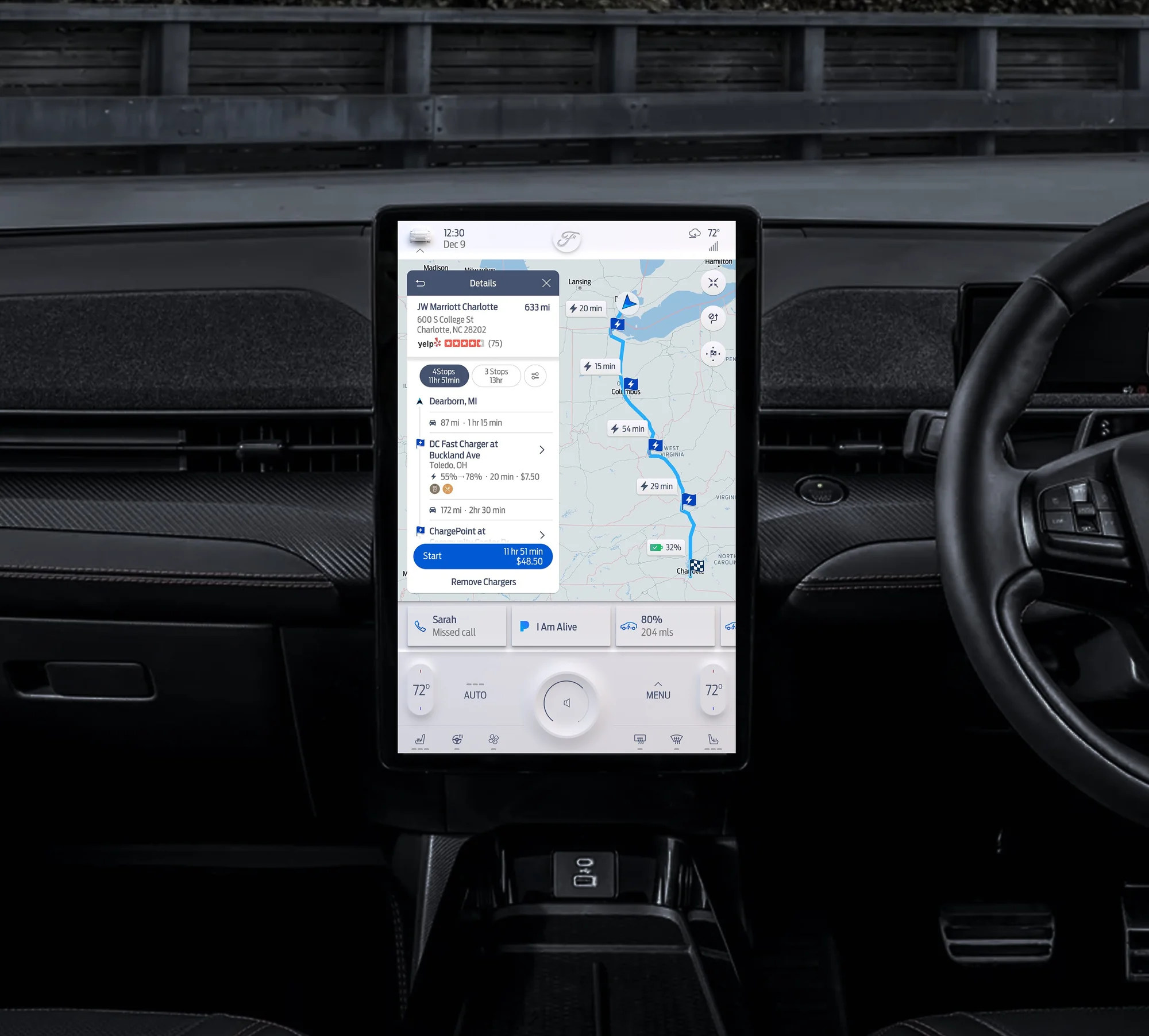
One navigation spec for Ford's next lineup
Ford engaged Telenav to design the navigation experience for SYNC4, its next-generation infotainment platform, launching across a new lineup of Ford and Lincoln vehicles.
The brief was to design and document the full navigation experience for SYNC4, ready for production: one cohesive experience across four screen sizes and two brands, in a waterfall model where the docs must be complete before development begins.
As the only UX designer, I had to write specs that answered questions before anyone asked them, held up in Ford's reviews, and were precise enough for a remote engineering team in China to build from. It had to be right before handoff.
Designing inside Ford's system
Telenav was a consultant to Ford, delivering navigation that lives inside Ford's broader infotainment ecosystem. The work had to fit Ford and Lincoln's design systems and feel native to the IVI environment around it.
Adapting a reference product
A reference navigation product already existed internally. My job was to adapt it for production: what to carry forward, what to modify, what to rethink for each screen and brand.

Consultant to client
Consulting means working within the client's processes and constraints. Decisions had to hold up in Ford's review sessions as well as our own.
One product, two brands, four screen sizes
Four screens spanned the lineup: Ford's 8", 12", and 15", plus Lincoln's 13.2". All landscape except the 15", which was portrait, so the layout had to flip as well as scale.
Hard choices on the smallest screen
The 8" screen forced hard calls about what a driver really needs. Anything that couldn't earn its space came off.

Safety on the largest screen
More room at 15 inches didn't mean more on screen. Touch targets had to suit real driving: easy reach, quick glances, and a density a driver can read. All designs follow NHTSA guidelines.

Start at 12 inches, then scale both ways
I started with the 12" screen as the baseline (closest to the reference) to establish the core patterns and architecture, then scaled in both directions, often working across sizes at once to pressure-test decisions.
What I designed
My focus was the UX: flows, wireframes, and the production specs the build ran on. A UI designer applied the visual styling and a cartographer tuned the map styling.
The map view is the primary canvas. Here it is in both brands, the same layout styled to each:


A closer look at each feature
Search & POI


Working through Ford's reviews
The waterfall challenge
In waterfall, the specs work like a contract. They have to answer every question a developer will hit, long after I'd moved on to the next feature.
I ran regular review sessions with Ford program managers, walking through flows and specs and fielding feedback that balanced UX quality against program constraints. Pushbacks were worked through to a shared decision, then the docs revised to match.
- 1 Design UX decisions made, flows and states documented in Confluence
- 2 Review Sessions with Ford program managers: feedback, pushbacks, change requests
- 3 Decide Discussion across disciplines until there was a shared decision
- 4 Revise Docs updated and handed to engineering as the final reference
When a decision was genuinely contested, we ran studies to validate the direction before committing it to the docs.
Specs thorough enough to build from
The Confluence documentation was the engineering team's primary build reference, and with no quick in-person clarifications it had to stand on its own. So they went down to each element: what existed, how it behaved, and every possible state.

The Design Home, the top of the spec tree: around sixteen feature areas, each expanding into sub-feature pages covering every state, size, and brand.
Interaction flow diagrams
End-to-end flows for every navigation feature, showing how users move through the product and how the system responds at each step.

Element callouts
Each screen annotated with callouts identifying every UI element: its name, purpose, and exact behavior within the navigation context.

Full state coverage
For every element, I documented all possible states so engineers had no ambiguity.

Nobody sees this part of the work, but it mattered as much as the design. The specs became the shared language between UX and engineering.
Writing state-level specs sharpened the design too: thinking through every state surfaced gaps before they became engineering problems.

Shipped across Ford's best-selling lineup
The navigation experience shipped in production Ford and Lincoln vehicles on SYNC4: the F-150, Bronco, Lincoln Aviator, and Lincoln Corsair. The 15" portrait variant for the Mustang Mach-E was completed but did not reach production due to contracting changes.
The work covered around sixteen feature areas, every state documented, across four screen sizes and both brands, and earned consistently positive feedback from Ford's program managers.

Designing within constraints
Brand guidelines, safety standards and a reference product could have felt limiting. Instead they made it easier to decide what actually matters to the driver. Being the only UX designer also showed me how much of the job is communication, and the way I wrote specs here has shaped how I hand off work on every project since.

